
Content creation workflow: 9 stages, owners and checks for video
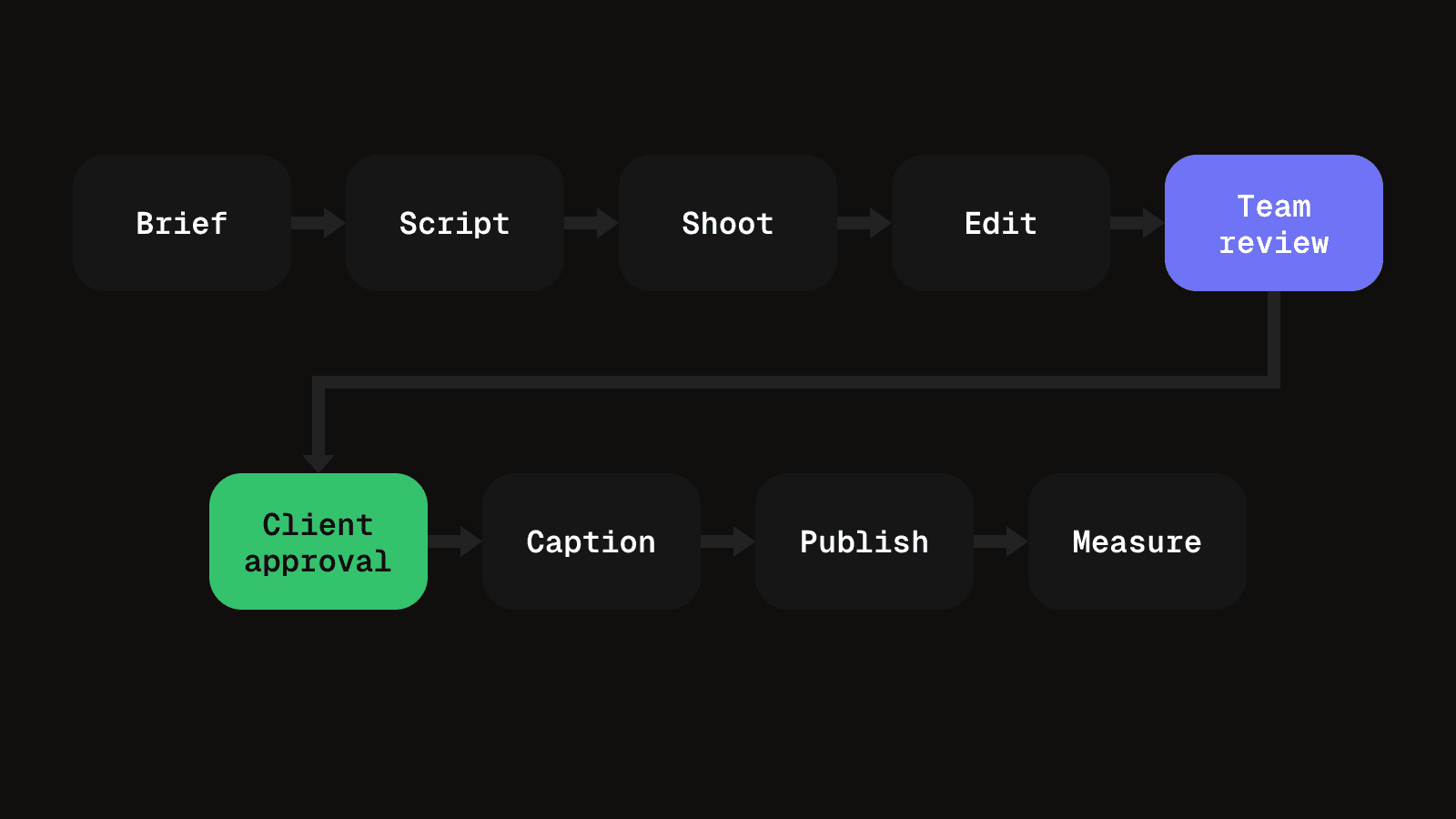
A content creation workflow for one short video runs through nine stages: brief, script, production, edit, internal review, client approval, captions and scheduling, publishing, and measurement. Each stage has an owner, an output and one check that stops the piece moving on too early. Keep internal and client review separate, approve a numbered version rather than a file, and put the caption inside that approval.
What a content creation workflow is and what it is not
A content creation workflow is the fixed order of stages a piece of content passes through, from the idea to the live post, with a named owner for each stage. It is made of stages, owners, the thing each stage hands on, and a rule for when a stage counts as done. For a video agency it is also the record of who may change the piece at each point.
It is not the same as a process document, which describes how to do one task, or a content calendar, which says when things go live. The workflow sits between them: it says who has the piece now and what must be true before it moves. If you are searching for a video content workflow or a content development workflow, this is the same thing with the video-specific stages named.
There are two ways to organise one. A task-based workflow lists the jobs in order and assigns each to a person, so the question is "what is left to do". A status-based workflow gives the piece a state, such as in edit or awaiting client, so the question is "where is it now". Task lists suit a single piece with a known team. Status suits agency client work, where many pieces sit at different points at once. The stages below are written as statuses with an owner and a check.
Before the brief, keep a place where ideas are collected and one person who decides which become briefs. After publishing, the same footage can often be cut into other formats, but each cut goes back through the same stages as a new piece.
The nine stages at a glance
Copy this table into your own document and replace the owners with names. The sections that follow explain each row.
| Stage | Owner, output and done when |
|---|---|
| Brief | Account lead. One-page brief. Done when the message fits in one sentence. |
| Script and shot list | Writer. Locked script and shot list. Done when it has been read aloud and timed. |
| Production | Camera operator or designer. Named raw files. Done when every shot has a usable take. |
| Edit | Editor. Numbered v1. Done when it opens on the hook and fits the target length. |
| Internal review | A reviewer who did not edit. Fixes applied or declined. Done when v1 matches the brief. |
| Client approval | Client decides. Approval naming a version. Done when a specific version is signed off. |
| Caption and scheduling | Scheduler. One post per destination. Done when each destination is checked on its own. |
| Publish | Scheduler. Live post and recorded link. Done when the file matches the approved version. |
| Measure | Account lead. A note on the brief's goal. Done when the learning is in the next brief. |
Two of those stages are reviews, and they are different jobs. That distinction is the part most workflows lose.
Brief the video before anyone shoots or writes
The brief is the cheapest stage and the one most often skipped. It is one page: who the video is for, the one message it carries, the platform, the length, and what success looks like for this post.
- Owner. The account lead or producer.
- Out. A brief with one message and one destination.
- Check. Can you state the message in one sentence? If the brief names two, it is two videos, and the later stages will fight each other.
Write the script and shot list
The writer produces a script with timings and a shot list that maps each line to something that can be filmed or designed.
- Owner. The writer or strategist.
- Out. A locked script, a shot list and a target length.
- Check. Read the script aloud and time it. A line that makes a claim nobody has confirmed means the script is not finished, whatever the draft looks like.
Produce the footage or design files
Production is the shoot for video and the design work for a carousel or a still.
- Owner. The camera operator, videographer or designer.
- Out. Raw footage or layered files, named by project and take.
- Check. Every line on the shot list has a usable take, and nothing sits on a personal device. Missing coverage is far cheaper to find now than in the edit.
Edit the first numbered cut
Internal iterations stay as unnumbered working files. The first version anyone outside the edit sees becomes v1, and numbering starts there.
- Owner. The editor.
- Out. A v1 that opens on the hook.
- Check. Does it run to the target length and open on the hook rather than a logo or a slow title? If the structure is still changing, it is not ready to be numbered.
Run internal review against the brief
A producer or second editor, not the person who made the cut, checks v1 against the brief. They ask whether the message comes through, whether length and platform fit, whether the claims match the approved script, and whether anything would embarrass the client.
- Owner. A reviewer who did not edit the cut.
- Out. A list of fixes, each applied or declined with a reason.
- Check. Is the cut judged against the brief and not against personal taste? A request for different music at this stage spends the client's patience in advance.
Keep this separate from client review. Merged, the client either sees rough work or approves things nobody checked, and your client becomes your quality control.
Get client review and approval in rounds
The client decides whether they are happy with what the cut represents, not whether it meets the brief. Each round needs a purpose, a deadline and a stated meaning for silence. Timestamped notes and version naming are covered in the client video review process.
- Owner. The account lead sends the cut. The client decides.
- Out. An approval that names a version, or one consolidated list of notes.
- Check. Does the approval name a specific version, such as v2? A thumbs-up on a message approves a file that may have changed since.
Write the caption and schedule each destination
The caption is copy, and copy can change what a video means. Approve it with the cut, not after it. One that promises something the video does not show is as much a problem as a wrong cut.
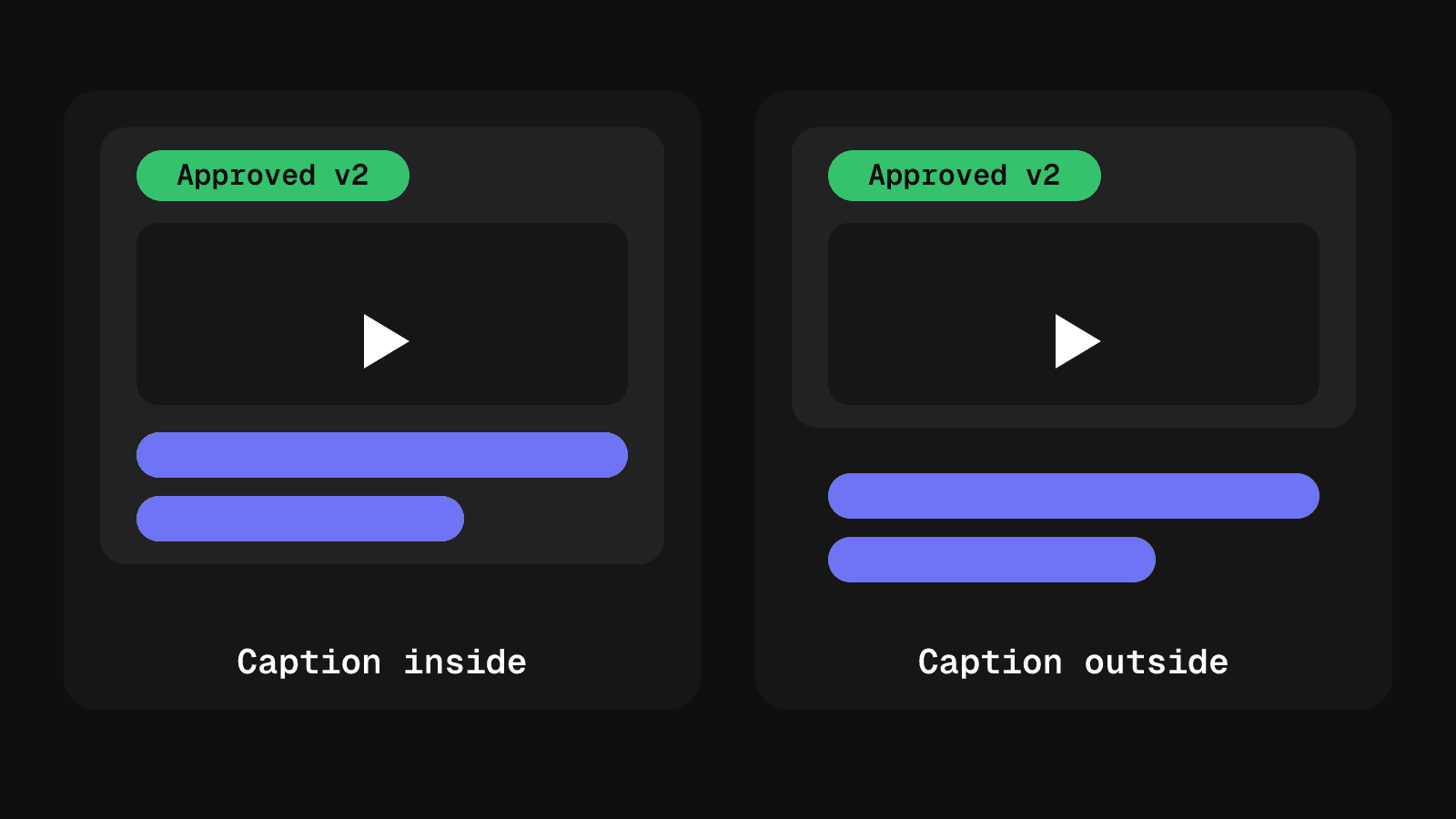
Each destination then needs its own scheduled post with its own caption and format rules. Check length and the video's aspect ratio, duration and file type against the platform's current specification, not an old template. YouTube, for example, categorises a video as a Short when it has a square or vertical aspect ratio and runs up to three minutes, so a template built on an older limit can misclassify a cut. The caption length checker and the social media video specs guide are the quickest way to confirm the numbers.
- Owner. The scheduler or account lead.
- Out. One scheduled post per destination, with caption and time set.
- Check. Each destination has been checked on its own. A caption that fits Instagram may be far too long elsewhere.
Publish the approved version
Approval is a fact about one version. A video re-exported after sign-off, or a caption edited afterwards, is a different piece of content carrying the old approval.
- Owner. The scheduler, or the platform's scheduling system.
- Out. A live post, with its link recorded against the content item.
- Check. The published file matches the approved version number.
Measure the result and feed it back
The output is a short note comparing what happened with the goal in the brief, not a dashboard of everything.
- Owner. The account lead.
- Out. One or two lines of learning that go into the next brief.
- Check. Did the video do the job the brief named, or did it do well on a measure the brief never asked for? Only the first answer should change the next script.
How the workflow changes for a post or carousel
The nine stages stay, but their weight shifts. A written post skips production and most of the edit, and its check moves to the copy: a factual error in a sentence costs as much as a wrong frame. A carousel replaces the shoot with design, and internal review becomes a slide-by-slide check. Client approval must cover every slide, because a change on slide five changes the whole post.
Run one video through all nine stages before you decide which to make heavier. The stages that cause the most rework in your own process are the ones to formalise first.
Questions people ask about a content creation workflow
It is the set order of stages a piece of content moves through, with an owner and a check at each one. It answers who has the piece now and what must be true before it moves on.
Use tasks when one small team makes one piece at a time. Use statuses when several pieces for several clients are in progress together, because you need to see where each one sits. Many teams keep a task list inside each status.
As many as there are handoffs between people. This post uses nine for a short video because each handoff has a different owner or a different decision. A written post can drop production and most of the edit.
Review it when a piece goes wrong, not on a fixed date. Find the stage where the problem entered, and add or tighten the check there. Keep the measure stage honest, because it feeds the next brief.
Not at first. A shared document with the table above is enough for one or two pieces moving through one reviewer. A tool helps once several pieces are in flight and nobody can say which version is approved.
Publish the approved cut, not a copy of it
Schedule each approved video to every destination with its own caption, and record the live link against the same content item.
See publishingKeep reading

How to build a content calendar that survives multiple clients
A content calendar built for one client collapses at three. Fix it with one sort date, fewer stages, and only the columns that earn their place.
8 min read
How to design an approval workflow that does not stall work
Design an approval workflow for any piece of work, a post, a cut or an invoice: choose the order, name one decider, lock the version, copy the template.
8 min read