
How to design an approval workflow that does not stall work
An approval workflow stalls for three reasons: no deadline, no single final decider, and an approved version that quietly changes. Name one decider, run independent checks in parallel, add a second level only when a mistake would cost more than the wait, and lock the approved version. Automation can remind, route and lock, but it cannot make a slow approver decide.
What an approval workflow is and how it differs from a review
An approval workflow is the set path a piece of work follows from "ready for a decision" to "approved or sent back", with named people at each step. It has four parts: submit the item, review it, decide, and record the decision against the exact version that was judged.
A review and an approval are not the same thing. Review is comments: several people can say what they notice. Approval is a decision: one person says the item may go ahead. A workflow that mixes the two leaves everyone commenting and nobody deciding.
It also differs from a content workflow, which covers the whole journey from brief to publishing. The approval step is the sign-off gate inside that journey, and it can be applied to a process (an invoice or a contract), a project (a campaign plan) or a single item (a post or a cut). For agency client work, the single item is the case that matters, because each one has its own version, its own client and its own deadline.
Where sign-off stalls
Work rarely fails by being refused. It stalls, for three reasons.
- No deadline. A review with no date stays open until someone chases it, and chasing depends on memory and goodwill. Give every step a date.
- No single decider. When two people can both say yes, each assumes the other will act. Several people can comment, but one person makes the final call.
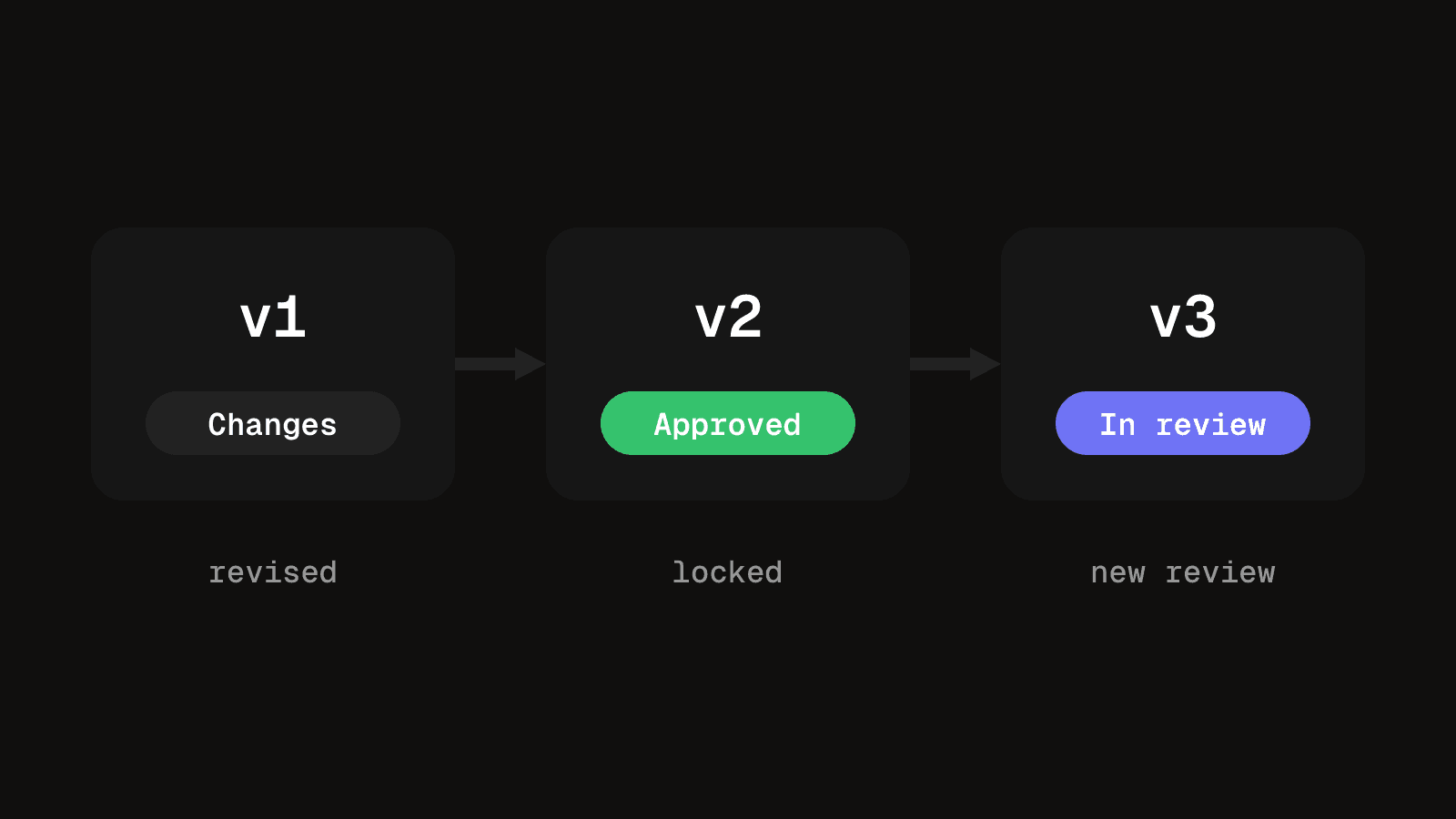
- An approved version that changes. Someone approves v2, the editor fixes a typo and publishes v3. The approval was real, but it was for something else. Any change after approval should start a new review.
A fourth cause is quieter: reviewers who do not know what to look at. "Please look at this" invites comments on everything. "Check the price and the claim in the first line" gets a decision.
Choose the order and the number of levels
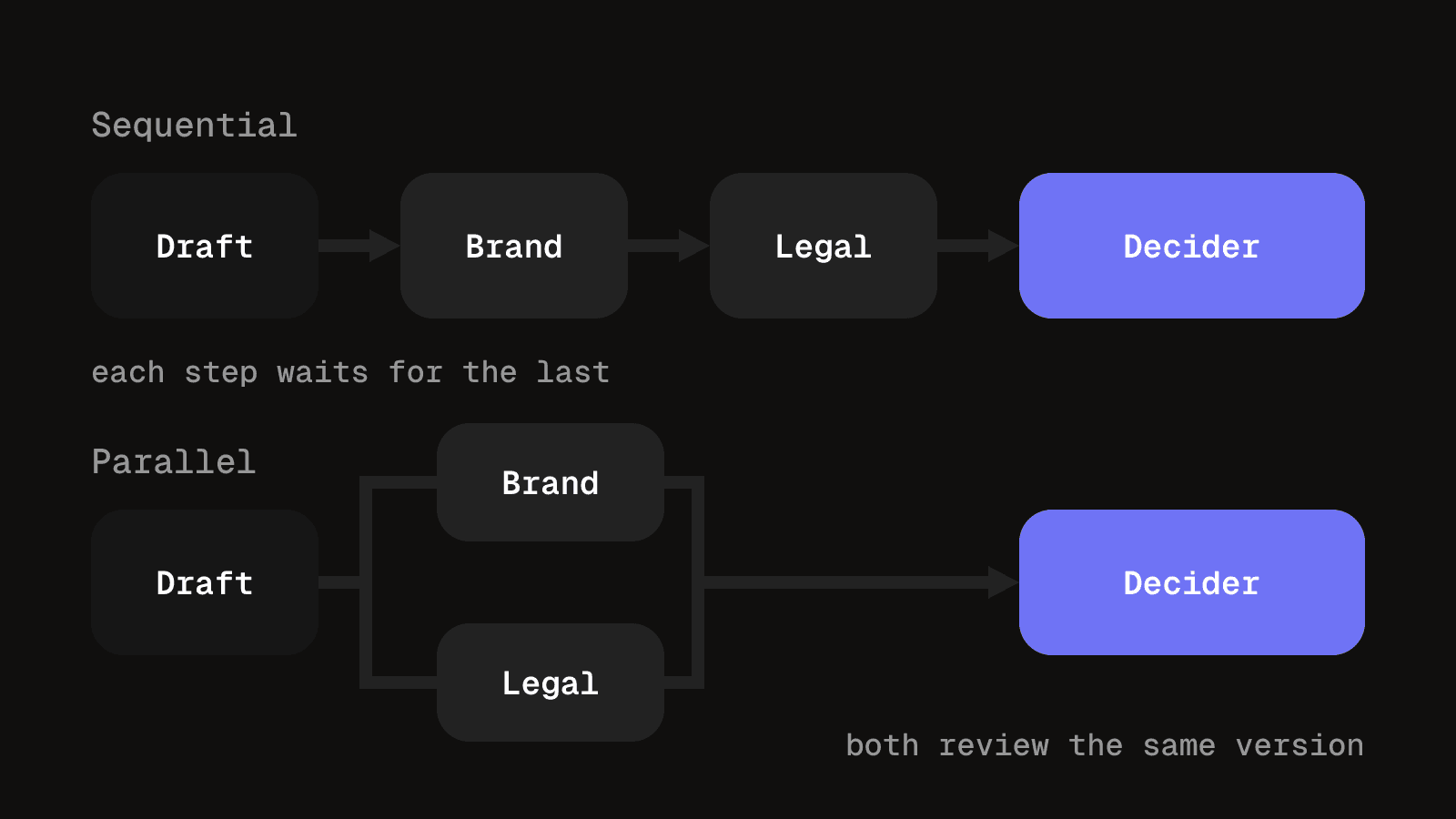
Sequential review sends the item to one person at a time, which is how the Power Automate approvals documentation describes its sequential approval type. Parallel review sends it to everyone at once, which is faster, but a rejection from one reviewer wastes the others' time.
| Order | What it means for a content team |
|---|---|
| Sequential | One reviewer at a time. Nobody spends time on work an earlier step will reject, so use it when a later check depends on an earlier one, such as legal after creative. |
| Parallel | Everyone at once. Faster, so use it only when the checks are independent, such as brand and product looking at different things. |
One decider is the right default for a small team. Add a second level only when a mistake costs more than the team can absorb: a product claim, a payment leaving the business, a statement under a client's legal name. Ask what the second level would catch that the first cannot. If the answer is nothing specific, remove it.
Route multi-level approvals by risk and name a backup
A multi level approval workflow sends different items down different paths, depending on what could go wrong. Decide the tiers by risk, not by habit, and write down which kind of item goes where.
- Low risk. A scheduled post from an approved template. The account lead decides alone.
- Medium risk. A new video cut for a client. The account lead checks it, then the client contact decides.
- High risk. A paid ad with a product claim, or anything under the client's legal name. The account lead checks it, the client contact decides, and a third person with the authority to refuse, such as the client's legal or compliance contact, signs off last.
Each tier is sequential, because each check depends on the one before. Only the tier changes, never the rule that one person makes the final call at each step.
Every step also needs a backup. People go on holiday and fall ill, and a review assigned to someone who is away stalls just as surely as one with no deadline. Name a deputy for each decider, and say who is contacted when a review is overdue. Put both in the template below.
Set up your sign-off path in five decisions
You do not need software to start. Decide these in writing before the first item goes through.
- What needs approval. Not everything. A repost of an already approved template may need no review. Draw the line.
- Who decides. One named person per kind of item.
- The order. Sequential or parallel, as above.
- The deadline and the silence rule. Agree whether no reply by the deadline means approved or means the date moves. Either works. Having no rule does not.
- The rejection path. Who revises, and whether the revision goes back to everyone or only to the person who objected.
Then run three or four real items through it and change whatever caused a wait.
A template to copy
Keep the template to one page, one copy per kind of item. If it grows longer, the process is doing more than the work needs.
| Field | What to write |
|---|---|
| Item | The kind of thing approved, such as a social post, a video cut or a monthly report |
| Version rule | How versions are numbered, and that approval attaches to one numbered version |
| Approvers and order | Each reviewer by name, in order, and whether steps run in sequence or in parallel |
| Decision states | A short fixed list, such as Draft, In review, Changes requested, Approved, Published, and what moves an item between them |
| Deadline per step | The date each review is due, and who is told when it is close |
| Silence rule | Whether no response means approved or means the publish date moves |
| Rejection path | Who revises, what they must answer, and who sees the revision |
| Final decider | The one person whose yes makes the item ready |
| Locked version | Any change after approval creates a new version and a new review |
| Escalation and backup | Who is contacted when a review is overdue, after how many days, and who deputises when the decider is away |
Three examples
- A social post. One decider, the account owner, plus a parallel check if the post makes a product claim. The deadline is 24 hours before the scheduled time. The silence rule is that it does not publish without a yes, because a post that goes out unapproved is hard to take back. The client side of that, batches, captions and silence rules, is in getting client sign-off on social posts.
- A video cut. Two rounds in sequence: structure and story first, then polish and facts, each with a date and one consolidated set of notes. The sign-off names the exact cut. Running that review is covered in the client video review process.
- A monthly invoice. Sequential, with a hard deadline tied to the billing date: the producer prepares it, the account lead checks it, the finance owner decides. Once sent, a changed total is a new document with its own approval, not an edit.
What automation can and cannot do
Software handles the mechanical parts: reminders before and after a deadline, passing work to the next reviewer, keeping the approved version fixed, and logging who said yes to which version. That is the point of recording approvals against each version.
It cannot make a slow approver decide, judge what is good enough, or settle two reviewers who disagree. It will also route work faithfully to a step nobody owns, so make the five decisions first.
A freelancer with one client who signs off by replying to a message can keep doing that, provided the approved version is named and saved where the next edit will look. A tool earns its place when waiting for approval is what slows delivery.
Questions people ask about approval workflows
It is the defined path an item takes to a yes or no: submit, review, decide, record. Each step has a named person and a date, and the decision is attached to one numbered version.
Submit the item with a clear request, review it against agreed points, decide, and record who decided on which version. If the answer is no, the item goes back to the reviser and the loop repeats on a new version.
Sequential when a later check depends on an earlier one, parallel when the checks are independent. Whichever you choose, one named person makes the final call.
One person per kind of item, with the authority to say yes. Others can comment, but they are reviewers, not deciders. Add a second level only when a mistake would cost more than the wait.
It depends on the silence rule you wrote down. Either no reply by the deadline means approved, or it means the publish date moves. Pick one per kind of item, and name a backup who is contacted when the deadline passes.
A workflow is the whole route work takes, from brief to publishing. An approval process is the sign-off gate inside it. You can have a full workflow with several approval steps, or a single approval step with little else around it.
Approvals recorded against each version
Send a numbered version to a client, collect the decision on that exact version, and keep the record with the work.
See client experienceKeep reading
Content approval process: stages, roles and client sign-off on social posts
A content approval process for agencies: stages, roles, a copyable template and client sign-off on social posts, with batches, a silence rule and a record.
9 min read
What is a client portal? A guide for agencies
A client portal gives each client one private view of their own work. See what it is, how to keep it secure, how to set one up and when to skip it.
10 min read